Client reports and dashboards for WordPress agencies.
You keep the sites running: backups, updates, security, uptime. Most of that work is invisible, so the client quietly wonders what the care plan is for. SendTidings is the client-facing layer that sits on top: a white-label dashboard and a plain monthly report showing the site is up, fast, secure and bringing in enquiries.
- ✓The reporting layer, not another maintenance tool
- ✓White-label dashboard, magic-link access, no login
- ✓Pairs with ManageWP or MainWP
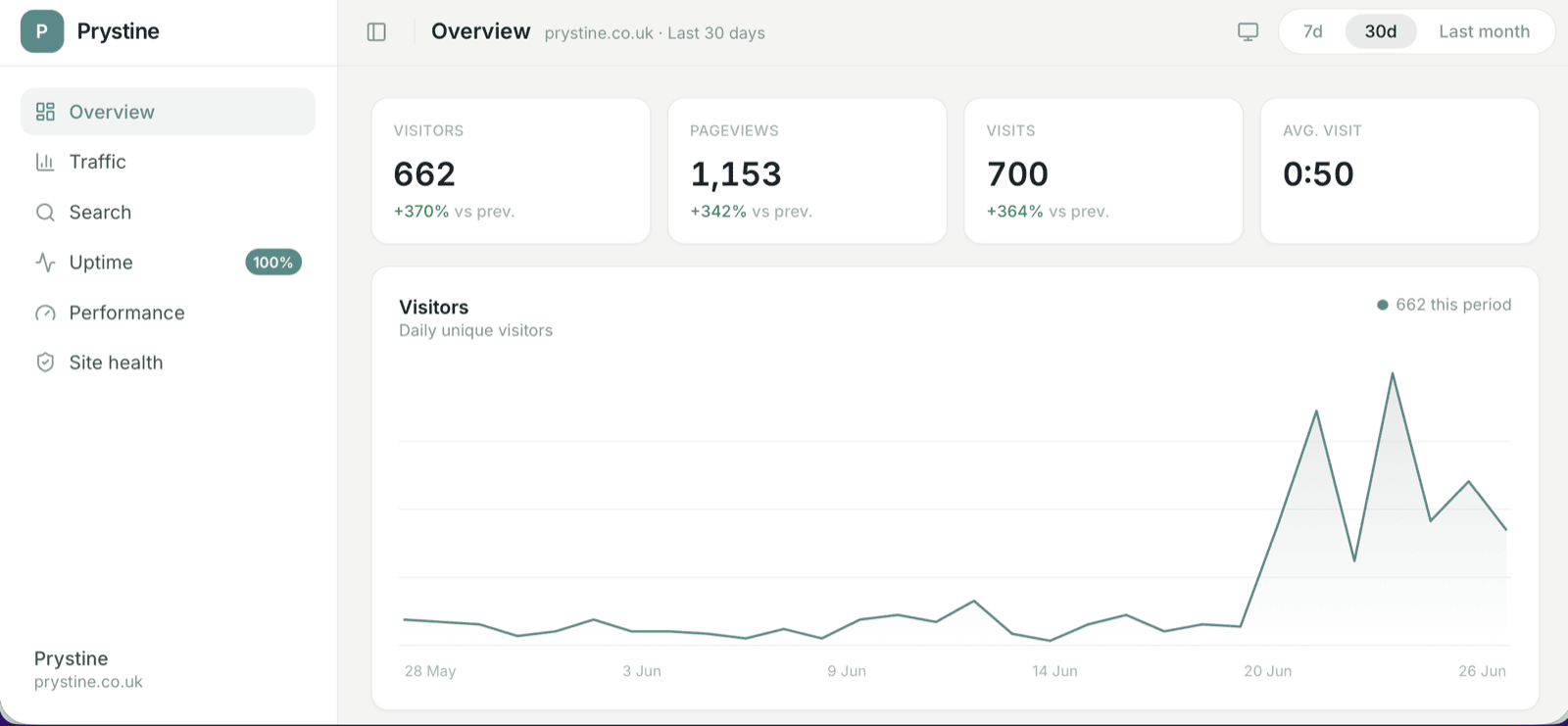
Care plans are invisible until a client can see them.
Most of the value in a care plan is work nobody watches you do: the nightly backup that never gets restored, the plugin update that stopped a break-in that never happened, the uptime that stayed boring. It’s the right work, and it’s the hardest to charge for, because a client who can’t see it eventually asks what they’re paying for.
A monthly report and a live dashboard fix that. The client opens something branded as you and sees the site is up, quick, secure and pulling in enquiries. The maintenance stays quiet in the background; the reporting is the part they read. That’s what turns a renewal from a question into a formality.
It pairs with your maintenance tool. It doesn’t replace it.
Backups, updates, security hardening, the plumbing that keeps a site standing up. Keep ManageWP, MainWP or whatever you already run. SendTidings takes no backups, runs no updates and hardens nothing.
The client-facing layer that sits on top, so the work those tools do finally has somewhere the client can see it. A white-label dashboard and a monthly report, across every site on the roster.
If you’re weighing the two, SendTidings vs ManageWP lays out where each one fits.
The other thing a WordPress-only tool can’t do: the client with a Shopify store, an Astro marketing site or a plain static build. SendTidings is stack-agnostic, so those clients get the same report format as your WordPress ones. You run one reporting tool across the whole roster rather than one per stack, and the client never notices which sites are WordPress and which aren’t.
Branded as you, not us.
Traffic, search, uptime, page speed and WordPress site health, laid out to be read in seconds. Your logo at the top, your accent colour throughout, your name on it.
It’s the full white-label client dashboard: a live view opened with a secure magic link, no account and no password, working just as well on a phone. For the clients who’d sooner read the letter, the same numbers arrive as a plain monthly report on the 1st.
Brand it once. Every client is covered.
Set your branding once
Add your logo, name and accent colour at the organisation level. Every client’s dashboard and report inherits it, so you’re not restyling anything per site.
Connect the analytics you use
Plausible, GA4, Matomo or Cloudflare for traffic, plus Search Console and uptime. Each site picks its own source and it reads over the API on a schedule, so there’s nothing for your client to install.
Clients open it with a link
A secure magic link, no account, works on a phone. Engagement tracking tells you who’s actually looked, which is quietly useful when a renewal comes round.
If a client has five WordPress sites with you, they’re all behind one link rather than five. It’s the client dashboard in full, and the same setup covers a Plausible site and a Shopify one without you thinking about it.
Outcomes and goals, not just graphs.
Traffic is nice, but a client on a care plan wants to know the site is bringing in work. So the dashboard goes further than a chart of visitors.
Real outcomes sit next to the traffic: call clicks, email clicks, contact-form submissions and WooCommerce purchases, each with its month-on-month change. Traffic is the means; enquiries are the point. (Plausible-based, in beta.)
Set measurable targets a client watches as live progress bars, and list recommended work they can request in a click. A reporting screen becomes a scoreboard you both watch, and a quiet way to win the next job. (Early access.)
That’s the difference between a dashboard a client glances at once and one that keeps them bought into the care plan between your calls.
A flat fee, not a per-site meter.
One fee for the whole roster, rather than a per-site charge that climbs every time you take on another WordPress build. Start free with the monthly report for a single site, and add the dashboard when you upgrade.
The full breakdown, including the unlimited Enterprise tier, is on the pricing page. Set against a per-site management add-on across a full client list, a flat tier tends to be the cheaper line once you’re past a handful of sites.
Questions from WordPress agencies.
Does SendTidings replace ManageWP or MainWP?
Do my clients need a WordPress login to see their reports?
Which analytics does it work with on WordPress sites?
Can it show WordPress site health, like SSL and updates?
I've got non-WordPress clients too. Can they go in the same place?
How much does it cost for an agency with lots of WordPress sites?
Give your WordPress clients something they can see.
Start free with the monthly report; add the white-label dashboard on Starter or Growth whenever you’re ready. No credit card to begin.